
Andmap ULTIMATE2.3.0.6 - Google Play
You'll be able to see results in few seconds.
Publisher Description
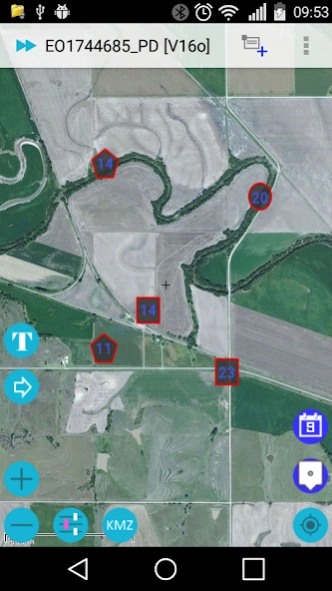
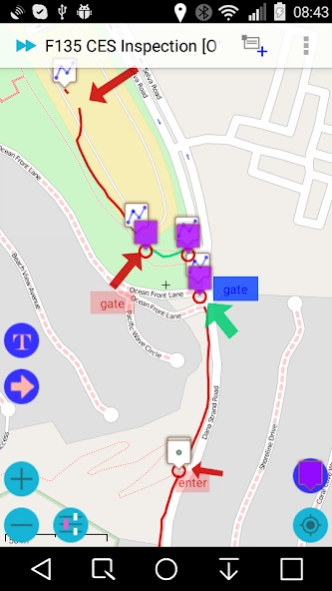
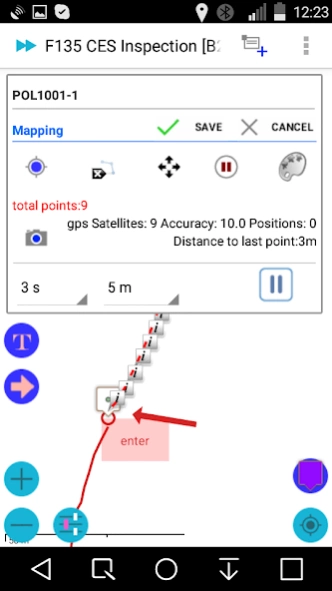
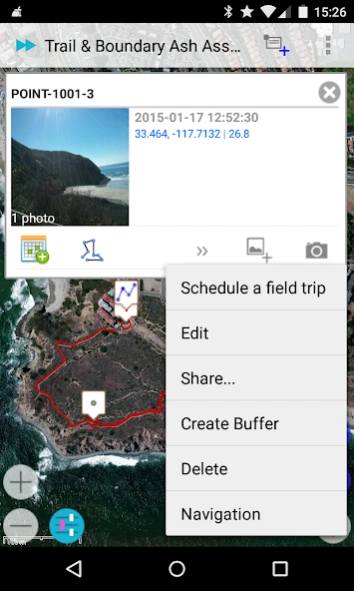
Andmap - Field Mapping, Data Collection and Online Project Management
Andmap - Field Mapping, Data Collection and Online Project Management
Core Features:
• Work offline - no internet connection required
• Real-time sync capability when internet available
• Mapping, collect data rich points, lines, polygons, and custom overlay - text or image
• Control color / style of polyline, polygon by attribute data
• Control icon of point, polyline, and polygon by attribute data
• Move whole object, or individual point
• Map annotation - Label / Arrow, Image Overlay - Crop photo
• Divide Polyline at a point
• Make copy of object
• KML / KMZ viewer
• Dynamic create Label image for KMZ image overlay
• Integration with 3rd party annotation tool
• Customize Data Collection Forms - attribute data
• Geo-tagged photo integrate with compass
• Task Management - see detail: http://blog.andmap.co/task-management-2/
• Position Averaging - calculating an average coordinate
• Auto Track - Auto record point, line, or polygon
• Offline Maps: Streetmap / topo or imagery base map
• WMS Viewer - Web Map Service
• Create Offline Maps directly from your device
• Share data in KMZ to cloud server, Dropbox, Google Drive...
• Import KMZ - images, icons, custom overlay, map annotation and attribute data
• Review | Edit | Export your data online
• Interface to your GIS - Shapefile, KML, KMZ, CSV, and GPX
• Daily work log
• Field trip planning - Schedule
• Task Management
• 0.1 meter accuracy in mapping
Targeted at GPS/GIS mapping professionals in industries such as Telecom, Oil / Gas, Forestry, Utility, Agriculture, Environmental and other natural resource industries in addition to local, state and federal government users.
Templates:
• CES Inspection
• Groundwater Monitoring
• Predictive vegetation mapping
• Soil Sampling
• Routine Wetland Determination
• Archaeological Survey
• Vehicle Inspection
• Waste Inventory Tracking
• Utility Pole
• Sediment Sampling
• Stream Side BIO Survey
• Pipeline Marker
• Well Inspection
• Home Inspection
• Well Inspection
• Pipeline Inspection
• Property Inspection
• Sewer / Manhole Assessment / Inspection
Benefits:
• Improved data quality and provide more complete data.
• Improved efficiency and minimized site revisits.
• Improved interface to the GIS.
• Will facilitate the collection of more data more quickly and thus increasing the usefulness of the GIS.
• Easier to use user interface that requires less training.
About Andmap ULTIMATE
The company that develops Andmap ULTIMATE is ANDMAP LLC. The latest version released by its developer is 2.3.0.6.
To install Andmap ULTIMATE on your Android device, just click the green Continue To App button above to start the installation process. The app is listed on our website since 2020-01-08 and was downloaded 0 times. We have already checked if the download link is safe, however for your own protection we recommend that you scan the downloaded app with your antivirus. Your antivirus may detect the Andmap ULTIMATE as malware as malware if the download link to com.andmap.android is broken.
How to install Andmap ULTIMATE on your Android device:
- Click on the Continue To App button on our website. This will redirect you to Google Play.
- Once the Andmap ULTIMATE is shown in the Google Play listing of your Android device, you can start its download and installation. Tap on the Install button located below the search bar and to the right of the app icon.
- A pop-up window with the permissions required by Andmap ULTIMATE will be shown. Click on Accept to continue the process.
- Andmap ULTIMATE will be downloaded onto your device, displaying a progress. Once the download completes, the installation will start and you'll get a notification after the installation is finished.
Program Details
System requirements
Download information
Pricing
Version History
version 2.3.0.6
posted on 2020-01-08
Fixes: Permission
New Map Source: Landscape Map
Customized Pipeline
filtering data
Custom Icons
Map Annotation
Push Notification
Dynamic custom map icon
KML / KMZ viewer
Add / Replace saved location
Large data - KMZ import
Map Annotation
Create Image for Overlay
Custom Overlay - Text or Image on top of Map
Position Averaging
Line Style, Line Width, Z-Order
Improved Moving Point
Field Trip Planning
Task Management
Conditional Forms
Geo-tagged photos in mapping mode
Auto Track
version 2.3.0.5
posted on 2018-07-31
New Map Source: Landscape Map
Customized Pipeline
filtering data
Custom Icons
Map Annotation
Push Notification
Dynamic custom map icon
KML / KMZ viewer
Add / Replace saved location
Large data - KMZ import
Map Annotation
Create Image for Overlay
Custom Overlay - Text or Image on top of Map
Position Averaging
Line Style, Line Width, Z-Order
Improved Moving Point
Field Trip Planning
Task Management
Conditional Forms
Geo-tagged photos in mapping mode
Auto Track
version 2.3.0.4
posted on 2017-10-27
Customized Pipeline Inspection: PL reading, meterrun...
Upload filtering data
Custom Icons
Map Annotation
Push Notification
Dynamic custom map icon
KML / KMZ viewer
Add / Replace saved location
Large data - KMZ import
Map Annotation
Create Image for Overlay
Custom Overlay - Text or Image on top of Map
Position Averaging
Line Style, Line Width, Z-Order
Improved Moving Point
Field Trip Planning
Task Management
Conditional Forms
Geo-tagged photos in mapping mode
Auto Track
version 2.3.0.2
posted on 2016-04-24
Upload filtering data,Custom Icons,Map Annotation,Push Notification,Dynamic custom map icon,KML / KMZ viewer,0.1 meter accuracy,Add / Replace saved location,Large data - KMZ import,Map Annotation,Backup in zip,Make copy of object,3rd party annotation,Create Image for Overlay,Custom Overlay - Text or Image on top of Map,Position Averaging,Line Style, Line Width, Z-Order,Improved Moving Point,Field Trip Planning,Task Management,Conditional Forms,Geo-tagged photos in mapping mode,Auto Track
Disclaimer
Official Google Play Link
We do not host Andmap ULTIMATE on our servers. We did not scan it for viruses, adware, spyware or other type of malware. This app is hosted by Google and passed their terms and conditions to be listed there. We recommend caution when installing it.
The Google Play link for Andmap ULTIMATE is provided to you by apps112.com without any warranties, representations or guarantees of any kind, so access it at your own risk.
If you have questions regarding this particular app contact the publisher directly. For questions about the functionalities of apps112.com contact us.
